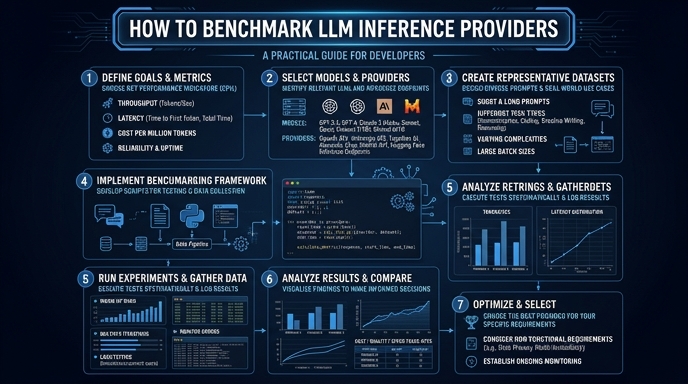
Choosing the right LLM inference provider requires more than just checking price sheets; it demands empirical data on latency, throughput, and error rates. Without a proper benchmarking suite, you risk performance bottlenecks that could degrade user experience in production environments. This guide walks you through setting up a programmatic benchmark using a standard OpenAI-compatible client. You will learn how to measure Time To First Token (TTFT) and total generation time to make data-driven infrastructure decisions.
Video guide
Prerequisites
- - Python 3.10+ installed. - An API key for your chosen inference providers. - Basic familiarity with the openai-python client library. - Access to an environment where you can execute synchronous or asynchronous requests.
Steps
- 1
Install the necessary dependencies
Start by installing the standard OpenAI SDK and a benchmarking library like 'httpx' or 'time' to track execution metrics. Ensure your environment is configured for asynchronous operations to mimic concurrent production traffic.
- 2
Define your test dataset
Create a JSON file containing a list of representative prompts that reflect your real-world application usage. This ensures your benchmarks account for variations in prompt length and expected output tokens.
- 3
Configure the OpenAI-compatible client
Initialize your client pointing to your target inference provider's endpoint using the base_url. Set the model name to 'smart-select' or the equivalent identifier provided by the vendor.
- 4
Measure Time To First Token (TTFT)
Implement a stream request loop to capture the exact timestamp of the first chunk received from the API. TTFT is a critical metric for perceived latency in chat applications.
- 5
Calculate throughput and total latency
Record the total elapsed time from request submission to the completion of the stream. Divide the total output tokens by the time taken to calculate tokens per second (TPS).
- 6
Aggregate and analyze results
Run your benchmark script multiple times to account for network jitter and cold starts. Calculate the p95 and p99 latency figures to understand the worst-case performance scenarios.
Code
import time
import asyncio
from openai import AsyncOpenAI

client = AsyncOpenAI(base_url='https://api.select.ax/v1', api_key='your_key')

async def benchmark_provider(prompt):
    start_time = time.perf_counter()
    ttft = None

    stream = await client.chat.completions.create(
        model='smart-select',
        messages=[{'role': 'user', 'content': prompt}],
        stream=True
    )

    async for chunk in stream:
        if ttft is None:
            ttft = time.perf_counter() - start_time

    total_time = time.perf_counter() - start_time
    return {'ttft': ttft, 'total_time': total_time}

asyncio.run(benchmark_provider('Explain benchmarking in one sentence.'))
Pro tips
Measure Cold Starts
Perform an initial 'warm-up' request before starting your main benchmark loop to avoid skewing data with cold start latency.
Use Synthetic Traffic
Simulate concurrent requests using 'asyncio.gather' to test how providers handle throughput saturation during peak load.
Validate Consistency
Run your benchmarks across different times of the day to account for potential rate limiting and regional server congestion.
Visual guide
Route your models intelligently
Use one API key for routing, fallback, and cost control across model providers.
Route your models intelligently — try Select