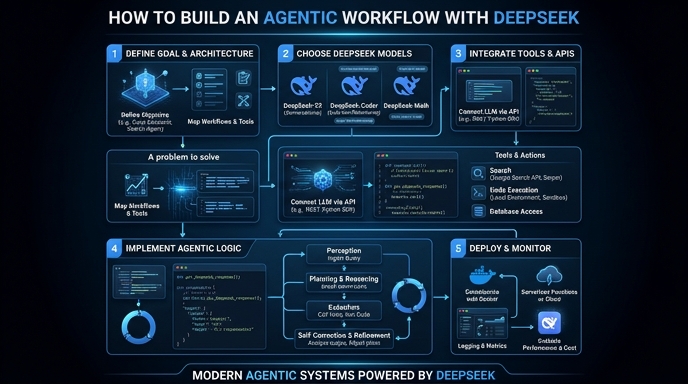
Building agentic workflows involves creating systems where LLMs can perform multi-step reasoning, tool usage, and iterative task refinement. By utilizing DeepSeek models within an agentic framework, developers can achieve complex autonomous behavior while maintaining tight control over the execution loop and context window management.
In this guide, you will learn how to implement a basic agentic loop that integrates tool calling capabilities. We will focus on setting up the OpenAI-compatible SDK to interact with the DeepSeek backend, enabling the model to decide whether it needs to fetch external data or process information directly to answer user prompts.
Prerequisites
- - A registered API key for the DeepSeek-compatible provider. - Python 3.10+ installed on your local environment. - The 'openai' Python library installed via pip. - Basic understanding of LLM message structures and tool calling definitions.
Steps
- 1
Configure the Client
Initialize the OpenAI client by specifying the custom base URL and your API key. Ensure you point the base_url to 'https://api.select.ax/v1' to correctly route requests to the DeepSeek infrastructure.
- 2
Define Available Tools
Create a list of tool definitions that the agent can invoke to perform specific actions like web searching or database queries. These tools must follow the JSON schema format required by the OpenAI SDK's tool-calling interface.
- 3
Construct the Agent Loop
Implement a `while` loop that sends the conversation history to the model along with the tool definitions. Check the response for 'tool_calls' to determine if the model needs to execute a function before providing a final answer.
- 4
Execute and Return Tool Output
If the model requests a tool, execute the corresponding function in your code using the arguments provided by the model. Append the tool output to the message history so the model can generate a final response based on the new context.
- 5
Finalize the Response
Once the model indicates that it no longer requires tools, send the final history back to the model to generate the concluding answer. Display this final text output to the user.
Code
from openai import OpenAI

client = OpenAI(base_url='https://api.select.ax/v1', api_key='YOUR_API_KEY')

tools = [{
    'type': 'function',
    'function': {
        'name': 'get_weather',
        'description': 'Get current weather',
        'parameters': {'type': 'object', 'properties': {'location': {'type': 'string'}}}
    }
}]

messages = [{'role': 'user', 'content': 'What is the weather in Berlin?'}]
response = client.chat.completions.create(model='smart-select', messages=messages, tools=tools)

if response.choices[0].message.tool_calls:
    # Execute tool logic here...
    print('Tool call detected:', response.choices[0].message.tool_calls[0].function.name)
Pro tips
Limit Recursion
Always implement a maximum iteration counter in your loop to prevent the agent from getting stuck in an infinite tool-calling cycle.
Use System Prompts
Provide a clear system prompt defining the agent's persona and tool constraints to improve the model's reliability in tool selection.
Validate Arguments
Sanitize and validate arguments returned by the model before passing them to your internal functions to prevent injection vulnerabilities.
Visual guide
Route your models intelligently
Use one API key for routing, fallback, and cost control across model providers.
Route your models intelligently — try Select