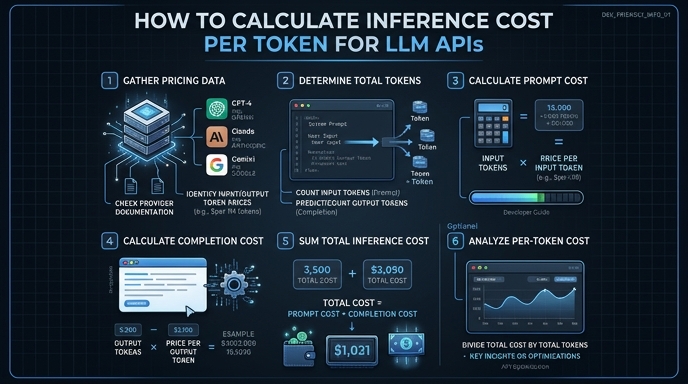
Understanding the precise cost of LLM inference is critical for scaling AI applications, especially when dealing with high-volume production traffic. Costs are typically calculated based on token consumption, including both input prompts and generated output completions. By tracking these metrics programmatically, developers can establish cost guardrails, optimize prompt engineering strategies, and forecast monthly operational expenses.
In this guide, we will demonstrate how to intercept response metadata from the OpenAI-compatible API to calculate the exact cost of your requests. You will learn to extract token usage counts and apply pricing constants to automate your cost tracking pipeline.
Prerequisites
- Access to an LLM API provider (e.g., Select.ax)
- Installed OpenAI Python SDK (pip install openai)
- Your API key stored as an environment variable
- Basic understanding of how pricing per 1M tokens works
Steps
- 1
Set up the API Client
Initialize the OpenAI client using your endpoint configuration. Point the base_url to 'https://api.select.ax/v1' and ensure your credentials are loaded from environment variables for security.
- 2
Make the API Call
Perform your inference request using the desired model, such as 'smart-select'. It is important to request the full completion response, as the usage statistics are returned alongside the generated text.
- 3
Access the Usage Object
Locate the 'usage' field in the API response object. This object contains specific integer counts for 'prompt_tokens', 'completion_tokens', and the 'total_tokens' sum.
- 4
Define Pricing Constants
Define the unit cost variables for input and output tokens based on the provider's pricing sheet. Use a per-token multiplier, often calculated by dividing the per-million-token price by 1,000,000.
- 5
Calculate and Log Costs
Multiply the extracted token counts by your pricing constants to get the final request cost. Store these values in your monitoring database or log them to an observability tool for granular cost tracking.
Code
import os
from openai import OpenAI

client = OpenAI(base_url="https://api.select.ax/v1", api_key=os.environ.get("API_KEY"))

# Pricing per 1M tokens
INPUT_PRICE_PER_M = 0.50
OUTPUT_PRICE_PER_M = 1.50

response = client.chat.completions.create(
    model="smart-select",
    messages=[{"role": "user", "content": "Explain quantum computing."}]
)

usage = response.usage
input_cost = (usage.prompt_tokens / 1_000_000) * INPUT_PRICE_PER_M
output_cost = (usage.completion_tokens / 1_000_000) * OUTPUT_PRICE_PER_M
total_cost = input_cost + output_cost

print(f"Request cost: ${total_cost:.6f}")
Pro tips
Account for cache hits
If your provider offers prompt caching, ensure you distinguish between 'prompt_tokens' and 'cached_tokens' in the usage object as costs often differ.
Use async for performance
When logging costs for batch jobs, use the AsyncOpenAI client to prevent network latency from blocking your main processing loop.
Implement a cost ceiling
Compare your calculated cost against a predefined 'max_request_cost' variable and abort the process if it exceeds your budget threshold.
Visual guide
Route your models intelligently
Use one API key for routing, fallback, and cost control across model providers.
Route your models intelligently — try Select