Choosing the right Large Language Model (LLM) depends heavily on the specific requirements of your application, such as reasoning capabilities, latency budgets, and operational costs. DeepSeek is often favored for high-performance, cost-effective reasoning tasks where budget constraints are tight, while Claude models, particularly the Opus and Sonnet variants, are widely recognized for their superior long-context handling, nuanced instruction following, and creative output quality. This guide helps developers evaluate their specific use cases to determine when to leverage DeepSeek's efficiency versus Claude's advanced reasoning and safety alignment.
Prerequisites
- An active OpenAI-compatible API key for your chosen providers.
- Basic familiarity with the OpenAI Python SDK or similar HTTP clients.
- A defined list of representative test prompts or a dataset for benchmarking your specific use case.
- Installed environment with the openai package (pip install openai).
Steps
- 1
Define Your Performance Metrics
Before implementation, establish clear benchmarks for your application, such as time-to-first-token, total latency, and cost per million tokens. Determine if your application prioritizes raw reasoning speed or deep, context-aware content generation.
- 2
Establish the Evaluation Framework
Create a standardized test harness using your core prompts to run against both models. Log the outputs consistently to compare quality, adherence to formatting instructions, and error rates across the two providers.
- 3
Implement a Model Router
Use a model router pattern in your code to abstract the provider choice. This allows you to toggle between endpoints dynamically without refactoring your entire codebase.
- 4
Execute Comparative Testing
Run your test suite against the endpoints for both models, capturing the responses and metrics. Ensure you are using similar temperature and system prompt settings to keep the comparison fair and reproducible.
- 5
Analyze Results and Iterate
Review the output logs to identify which model better handles your specific edge cases. Balance the qualitative results against your cost and latency constraints to finalize your selection.
Code
import os
from openai import OpenAI

# Configure the client for a neutral model selection endpoint
client = OpenAI(
    base_url="https://api.select.ax/v1",
    api_key=os.environ.get("API_KEY")
)

def get_ai_response(prompt, model_choice):
    # model_choice would be either 'deepseek-chat' or 'claude-3-5-sonnet'
    response = client.chat.completions.create(
        model="smart-select",
        messages=[{"role": "user", "content": prompt}],
        extra_body={"provider": model_choice}
    )
    return response.choices[0].message.content

# Run comparison logic
result_deepseek = get_ai_response("Explain quantum computing.", "deepseek-chat")
print(f"DeepSeek output: {result_deepseek}")
Pro tips
Prioritize Long Context
If your workload involves summarizing massive technical documents or entire codebases, Claude generally offers superior performance and token window stability.
Optimize for Costs
For high-volume, simple tasks like classification or basic extraction, utilize DeepSeek to significantly reduce your inference expenditure without a major drop in accuracy.
Use System Prompts
Always use specific system prompts to guide model behavior, as different models may require slight adjustments to persona definitions to achieve consistent outputs.
Visual guide
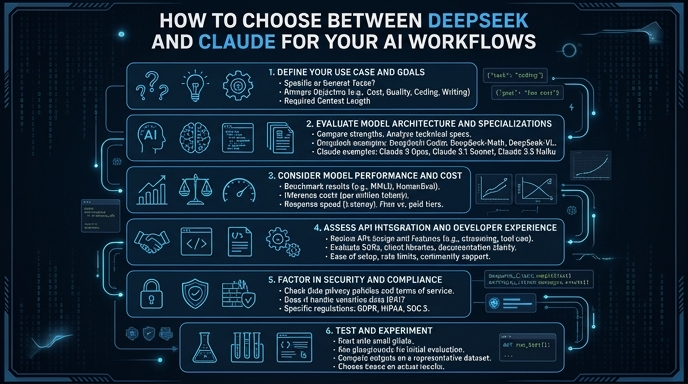
Route your models intelligently
Use one API key for routing, fallback, and cost control across model providers.
Route your models intelligently — try Select