Balancing inference costs against output quality is critical for scalable AI applications. Rather than defaulting to the most expensive frontier model for every request, developers can implement intelligent routing strategies to match task complexity with the appropriate model. This guide focuses on using a smart-routing approach to minimize token spend without sacrificing performance for routine tasks.
You will learn how to implement a conditional routing layer that delegates simple tasks—like classification or routine extraction—to efficient, low-cost models, while reserving high-capability models for complex reasoning or creative generation. This pattern directly reduces operational costs and improves latency for the majority of your user requests.
Prerequisites
- 1. An active API key from your LLM provider. 2. A development environment configured with the OpenAI SDK. 3. A baseline understanding of your application's request complexity. 4. A list of model identifiers categorized by performance tiers (e.g., 'cost-efficient' vs 'high-performance').
Steps
- 1
Analyze Query Complexity
Before sending an inference request, classify your incoming prompt based on expected complexity. Simple tasks like data extraction or sentiment analysis often perform equally well on lightweight, cost-effective models.
- 2
Define Model Tiers
Group your available models into 'Efficiency' and 'Performance' tiers. Keep a configuration map that maps your task types to these tiers, allowing for quick updates as model pricing and capabilities change.
- 3
Implement Routing Logic
Create a wrapper function that selects the target model dynamically based on your complexity classification. If the task is standard, default to the efficiency tier to save on token costs.
- 4
Configure the Inference Client
Initialize the OpenAI SDK with the routing service endpoint. Ensure you use the specific base URL and model identifiers provided by your routing infrastructure to handle the request forwarding.
- 5
Monitor and Fallback
Implement an observability step to log which model was selected for each request. If the cheaper model fails to meet quality thresholds, set up an automatic fallback to the high-performance model for that specific user session.
Code
import { OpenAI } from 'openai';

const client = new OpenAI({
  baseURL: 'https://api.select.ax/v1',
  apiKey: process.env.ROUTING_API_KEY,
});

async function getSmartInference(prompt, isComplex = false) {
  const model = isComplex ? 'performance-model' : 'smart-select';

  try {
    const response = await client.chat.completions.create({
      model: model,
      messages: [{ role: 'user', content: prompt }],
    });
    return response.choices[0].message.content;
  } catch (error) {
    console.error(`Inference failed with model ${model}:`, error);
    throw error;
  }
}
Pro tips
Start with a Baseline
Run your current workload entirely on high-performance models for a week to establish a 'ground truth' for quality before implementing routing.
Cache Routine Responses
If you are routing repetitive tasks to cheaper models, implement a semantic cache to skip inference entirely for common inputs.
Monitor the Fallback Rate
Keep a close watch on how often you fall back to expensive models; if it happens too frequently, your routing logic may be incorrectly classifying task complexity.
Visual guide
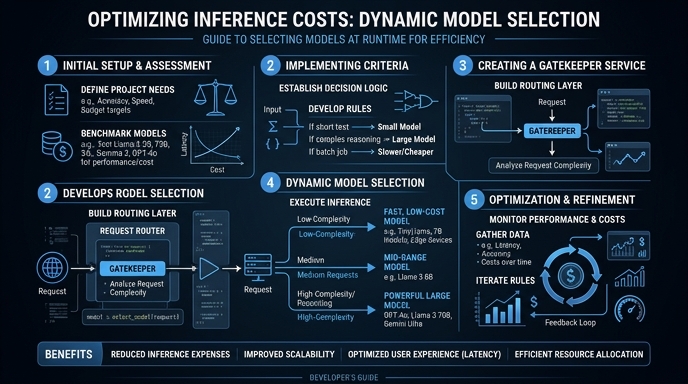
Route your models intelligently
Use one API key for routing, fallback, and cost control across model providers.
Route your models intelligently — try Select