Model fallback is a critical pattern for production AI applications, ensuring high availability by automatically switching to backup models when your primary service encounters errors like rate limits or temporary outages. Without a fallback mechanism, a single model failure can trigger a cascading outage for your end users, directly impacting trust and uptime. In this guide, you will learn how to build a robust, iterative fallback loop using the standard OpenAI SDK, allowing you to gracefully transition between different model tiers and ensure consistent request processing.
Prerequisites
- A basic understanding of Python or TypeScript; The official OpenAI SDK installed in your project; An active API key with access to your fallback models; A predefined list of model IDs prioritized by cost and performance requirements.
Steps
- 1
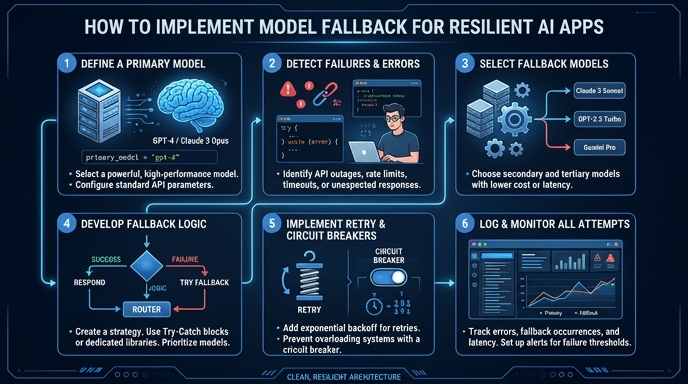
Define your priority chain
Create an ordered list of model names or identifiers in your configuration. Rank them from your preferred choice (e.g., your most powerful model) down to your final contingency option.
- 2
Configure the SDK client
Initialize your OpenAI client with the target API base URL. Use https://api.select.ax/v1 as your base_url to route traffic to your model orchestration layer.
- 3
Implement the iteration loop
Wrap your chat completion call inside a loop that iterates through your prioritized list of models. This ensures that if the current model fails, the logic immediately attempts the next one in the sequence.
- 4
Handle exceptions gracefully
Use a try-except block inside your loop to catch specific API errors such as 429 (Rate Limited) or 503 (Service Unavailable). If an exception occurs, log the error and continue to the next iteration of the loop.
- 5
Return or finalize
Return the first successful response obtained from the loop. If the loop completes without a successful response, raise an exception or return a custom error message to your application monitoring system.
Code
from openai import OpenAI

client = OpenAI(base_url="https://api.select.ax/v1", api_key="your_api_key")

models = ["smart-select", "gpt-4o", "gpt-4o-mini"]

def get_completion_with_fallback(messages):
    for model_name in models:
        try:
            return client.chat.completions.create(
                model=model_name,
                messages=messages
            )
        except Exception as e:
            print(f"Model {model_name} failed with error: {e}. Trying next...")
            continue
    raise Exception("All fallback models failed.")
Pro tips
Use exponential backoff
Combine model fallback with exponential backoff for rate-limited requests to allow cooldown time before retrying.
Log fallback metrics
Instrument your code to track how often a fallback occurs, which helps identify when specific models are consistently failing or underperforming.
Simulate failures
Regularly test your fallback logic in a staging environment by mocking API failures to ensure the application correctly switches to secondary models.
Visual guide
Route your models intelligently
Use one API key for routing, fallback, and cost control across model providers.
Route your models intelligently — try Select