High latency in AI applications directly degrades user experience, turning real-time interactions into frustrating waits. For developers, reducing the time-to-first-token (TTFT) and overall response time is critical for building responsive, reliable AI-driven products.
In this guide, you will learn how to optimize your integration by implementing streaming responses, pruning output length, and using parallel execution patterns. These strategies will help you deliver faster, more fluid AI interactions without compromising on output quality.
Prerequisites
- An active API key with provider access.
- A configured development environment with Node.js or Python installed.
- Existing integration using the standard OpenAI SDK format.
- A clear understanding of your application's critical latency path.
Steps
- 1
Enable Response Streaming
Streaming allows your UI to render partial responses as they are generated, drastically improving perceived performance. Enable the stream parameter in your API calls to begin processing data chunks immediately rather than waiting for the full completion payload.
- 2
Minimize Output Token Counts
Latency is directly proportional to the number of tokens generated; shorter outputs finish faster. Use strict system instructions or output length constraints to force the model to provide concise answers, reducing total generation time.
- 3
Parallelize Independent Requests
Avoid blocking execution by chaining independent API calls sequentially. If your application logic requires multiple data points, fire these requests concurrently using asynchronous patterns like Promise.all() to utilize the network more efficiently.
- 4
Optimize Prompt Context
Excessive context adds overhead to every request, increasing the time to first token. Prune your prompt, remove redundant historical messages, and cache frequently used system instructions to keep the input payload lean and fast.
- 5
Implement Strategic Fallbacks
If latency spikes, your application should handle it gracefully without failing. Set reasonable request timeouts and implement fallback logic that switches to a faster, smaller model or returns a cached response if the primary model exceeds your latency budget.
Code
import OpenAI from 'openai';

const client = new OpenAI({
  baseURL: 'https://api.select.ax/v1',
  apiKey: process.env.AI_API_KEY,
});

async function getFastResponse(prompt: string) {
  const stream = await client.chat.completions.create({
    model: 'smart-select',
    messages: [{ role: 'user', content: `${prompt} Answer in under 50 words.` }],
    stream: true,
    max_tokens: 150,
  });

  for await (const chunk of stream) {
    process.stdout.write(chunk.choices[0]?.delta?.content || '');
  }
}

getFastResponse('Explain latency optimization.');
Pro tips
Measure TTFT
Always track 'Time To First Token' as your primary metric, as it determines how responsive your application feels to users.
Use Structured JSON
When generating JSON, keep schema definitions minimal and avoid verbose field names to save on token overhead.
Batch Related Tasks
Combine multiple sequential sub-tasks into a single prompt whenever possible to save on network round-trip overhead.
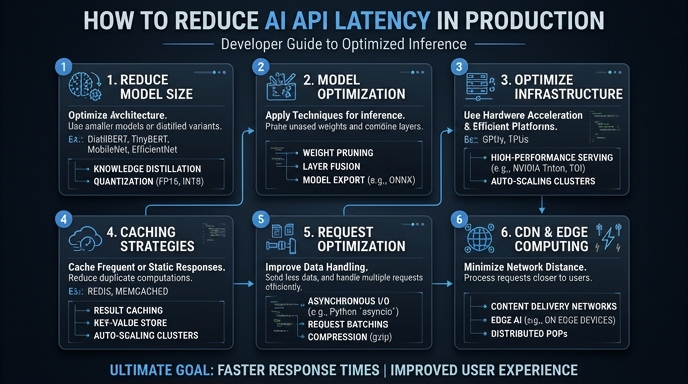
Visual guide
Route your models intelligently
Use one API key for routing, fallback, and cost control across model providers.
Route your models intelligently — try Select