Many applications default to high-end, proprietary models for every task, leading to ballooning API bills. However, simple operations like classification, summarization, or entity extraction rarely require top-tier performance and can often be handled effectively by smaller, lower-cost, or open-source models.
This guide demonstrates how to implement intelligent model routing. By directing simpler tasks to a cost-effective endpoint while reserving high-performance models for complex reasoning, you can significantly slash your monthly inference costs without sacrificing the quality of your core user experience.
Video guide
Prerequisites
- An active subscription or API key for an LLM provider or proxy service.
- Python 3.10+ installed on your local development environment.
- The standard OpenAI Python SDK installed ('pip install openai').
- A basic understanding of your application's token usage patterns.
Steps
- 1
Analyze and Categorize Your Tasks
Audit your existing API calls to distinguish between tasks that require complex reasoning versus those that are routine. Tag your requests into tiers, such as 'Light' for simple classification and 'Complex' for architectural or multi-step logic.
- 2
Configure the Client for Model Routing
Instantiate your API client using the standard OpenAI SDK but pointing to your routing gateway. By setting a base_url, you can intercept requests and dynamically decide which model to invoke based on the task tag.
- 3
Implement the Router Logic
Create a function that inspects the request parameters before dispatching. If the task is flagged as 'Light', route it to a smaller, open-source model; otherwise, proceed with your standard high-performance model.
- 4
Execute and Monitor Requests
Use the 'smart-select' model endpoint provided by your gateway to handle the routing transparently. Ensure your code monitors the response metadata to verify that the correct model is being selected for the specific input type.
- 5
Fine-Tune Based on Latency and Quality
Review the logs to ensure that your smaller models are maintaining the required quality threshold for your use case. If you notice a drop in performance, adjust your routing logic to promote those specific task types back to your primary model.
Code
import os
from openai import OpenAI

client = OpenAI(
    base_url="https://api.select.ax/v1",
    api_key=os.environ.get("API_KEY")
)

def get_optimized_response(prompt, task_type):
    # Routing logic: use smart-select to automatically pick the cost-effective model
    model_name = "smart-select" if task_type == "light" else "claude-3-sonnet"

    response = client.chat.completions.create(
        model=model_name,
        messages=[{"role": "user", "content": prompt}]
    )
    return response.choices[0].message.content

# Example usage
result = get_optimized_response("Classify this sentiment.", "light")
print(result)
Pro tips
Monitor Token Consumption
Use logging tools to track input vs. output token costs separately to identify if you are overpaying for verbose model responses.
Leverage Prompt Caching
Cache common system prompts and long context windows to reduce your input token bill by up to 90% for repeated requests.
Batch Non-Urgent Tasks
For background jobs or asynchronous processing, use batch endpoints to receive significant discounts on token pricing.
Visual guide
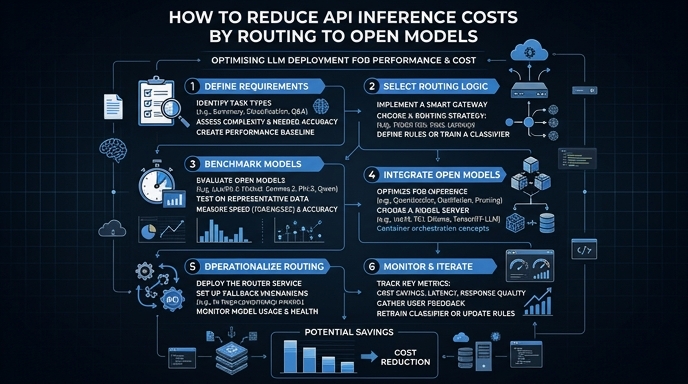
Route your models intelligently
Use one API key for routing, fallback, and cost control across model providers.
Route your models intelligently — try Select