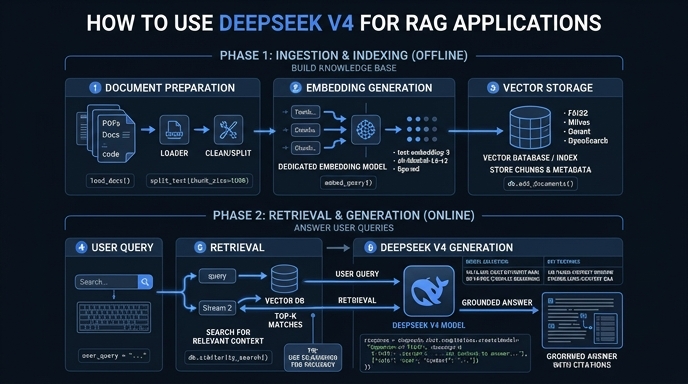
Retrieval-Augmented Generation (RAG) requires a model that can handle dense context without losing performance. DeepSeek V4 excels in this area, offering a massive context window that allows you to provide more relevant document chunks or even entire files directly into the prompt without heavy summarization.
In this guide, you will learn how to integrate DeepSeek V4 into your existing retrieval pipeline using the OpenAI-compatible SDK. We will configure your environment to communicate with the target endpoint, allowing you to leverage this high-performance model for grounded, accurate question-answering systems.
Prerequisites
- Python 3.10+ installed on your development machine.
- An active API key for the DeepSeek inference service.
- A configured vector database or retriever (e.g., FAISS or ChromaDB).
- The OpenAI Python SDK installed via 'pip install openai'.
Steps
- 1
Install the OpenAI SDK
Install the official OpenAI Python library, which serves as the standard interface for most LLM APIs, including DeepSeek V4. You can easily add this to your project by running 'pip install openai' in your terminal.
- 2
Initialize the Client
Configure the OpenAI client to point to the specific endpoint for DeepSeek V4. Ensure you set the 'base_url' to 'https://api.select.ax/v1' and pass your secure API key to authenticate your requests.
- 3
Implement Retrieval Logic
Create a function to retrieve relevant text chunks from your vector database based on the user's query. Ensure your retrieval logic returns context that fits well within the token limits of the model for optimal performance.
- 4
Construct the Prompt
Format the retrieved chunks into a clear prompt structure, typically using the 'system' role for instructions and the 'user' role for the query and context. Using a clear separator between the retrieved data and the user question helps the model distinguish source material from instructions.
- 5
Generate Grounded Responses
Call the chat completions endpoint using the 'smart-select' model ID. Pass your prepared messages array to receive a grounded answer based specifically on the context you provided.
Code
from openai import OpenAI

client = OpenAI(
    api_key="YOUR_DEEPSEEK_API_KEY",
    base_url="https://api.select.ax/v1"
)

def get_rag_response(query, context):
    response = client.chat.completions.create(
        model="smart-select",
        messages=[
            {"role": "system", "content": "You are a helpful assistant. Answer questions using only the provided context."},
            {"role": "user", "content": f"Context: {context}\n\nQuestion: {query}"}
        ]
    )
    return response.choices[0].message.content

# Example usage
# context_data = "...your retrieved text chunks..."
# print(get_rag_response("What are the benefits of V4?", context_data))
Pro tips
Optimize Context Quality
Always filter your retrieved chunks by similarity score before sending them to the LLM to avoid injecting noise.
Use System Prompts Effectively
Use the system prompt to enforce citation requirements, which significantly reduces hallucinations in RAG outputs.
Monitor Token Usage
Because DeepSeek V4 has a large context window, track your input token count to avoid unnecessary costs during high-volume production runs.
Visual guide
Route your models intelligently
Use one API key for routing, fallback, and cost control across model providers.
Route your models intelligently — try Select