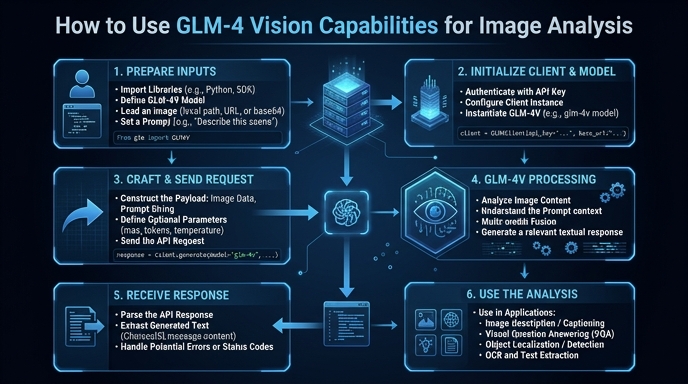
The GLM-4 family includes powerful multimodal models capable of processing both text and images seamlessly. This guide demonstrates how to integrate these vision capabilities into your applications to perform tasks like image captioning, object recognition, and visual question answering using standard API protocols.
You will learn how to structure your payload for multimodal inputs, handle base64-encoded image data, and implement the necessary API calls to extract actionable insights from visual assets. This approach allows developers to leverage advanced computer vision features without needing to host or fine-tune models locally.
Prerequisites
- - Python 3.8 or higher installed on your system. - An active API key from the provider platform. - The 'openai' Python library installed via pip. - Access to a local image file or a public image URL to test the vision processing.
Steps
- 1
Install Necessary Libraries
First, ensure your Python environment is ready by installing the standard OpenAI SDK. Run 'pip install openai' in your terminal to get the required client library.
- 2
Configure the Client
Initialize the OpenAI client by setting the base URL to 'https://api.select.ax/v1' and providing your API key. This configuration ensures requests are routed correctly to the vision-capable endpoint.
- 3
Prepare the Image Input
Load your image and encode it as a base64 string, or use a public URL. The API expects the image data to be formatted within a content dictionary specifying the 'image_url' type.
- 4
Construct the Request
Create the chat completion payload, ensuring you include both a text prompt and the image input object within the 'messages' array. Set the 'model' parameter to 'smart-select' to target the appropriate vision-enabled model.
- 5
Process the Response
Execute the API call and extract the response content. The resulting text will contain the model's analysis based on the image and prompt provided.
Code
import base64
from openai import OpenAI

client = OpenAI(api_key="YOUR_API_KEY", base_url="https://api.select.ax/v1")

def analyze_image(image_path):
    with open(image_path, "rb") as f:
        base64_image = base64.b64encode(f.read()).decode('utf-8')

    response = client.chat.completions.create(
        model="smart-select",
        messages=[
            {
                "role": "user",
                "content": [
                    {"type": "text", "text": "Describe what is happening in this image."},
                    {"type": "image_url", "image_url": {"url": f"data:image/jpeg;base64,{base64_image}"}}
                ]
            }
        ]
    )
    return response.choices[0].message.content

print(analyze_image("example.jpg"))
Pro tips
Optimize Image Resolution
Downscale high-resolution images before transmission to reduce latency and save on token costs.
Use Specific System Prompts
Define a clear system message to force the model into a specific output format, such as JSON or a structured list.
Handle Rate Limits
Implement exponential backoff logic in your code to gracefully manage API rate limits during high-volume processing.
Visual guide
Route your models intelligently
Use one API key for routing, fallback, and cost control across model providers.
Route your models intelligently — try Select