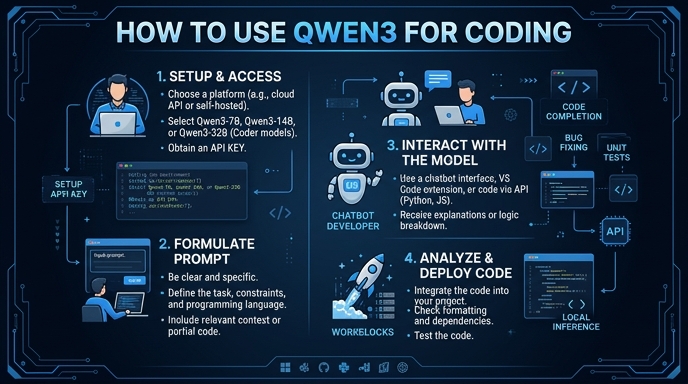
Qwen3 and its specialized coding variants are powerful tools for software development, offering advanced agentic capabilities and native support for massive context windows. By leveraging these models, you can automate refactoring, debug complex multi-file repositories, and generate high-quality code snippets with improved accuracy and reasoning.
This guide demonstrates how to integrate the Qwen3 coding models into your development workflow using a standard, OpenAI-compatible API interface. You will learn to set up the client, authenticate your requests, and structure your prompts to effectively handle coding tasks such as function implementation and code analysis.
Prerequisites
- 1. An active API key from your preferred model provider. 2. Python 3.9 or higher installed on your development machine. 3. The official OpenAI Python SDK installed via 'pip install openai'. 4. A basic understanding of your project's codebase structure for effective context provisioning.
Steps
- 1
Install Necessary Dependencies
First, ensure you have the OpenAI Python client installed in your environment. You can install it quickly using your terminal with the command 'pip install openai'.
- 2
Initialize the API Client
Configure the client to point to the correct inference endpoint and use your provided API key. Using the 'base_url' of 'https://api.select.ax/v1' ensures compatibility with the required gateway.
- 3
Select the Right Qwen3 Model
For coding-specific tasks, utilize the 'smart-select' model identifier. This model is fine-tuned for high-performance reasoning and code generation workflows.
- 4
Structure Your Coding Prompt
When prompting, provide context by including relevant file snippets or language requirements. Clearly define the task, such as 'Refactor this function to improve performance' or 'Write a unit test for this class'.
- 5
Execute and Parse the Response
Send the completion request to the API and handle the returned stream or final message object. Ensure you extract only the content generated within the response to maintain clean output for your files.
Code
from openai import OpenAI

client = OpenAI(
    base_url="https://api.select.ax/v1",
    api_key="YOUR_API_KEY_HERE"
)

response = client.chat.completions.create(
    model="smart-select",
    messages=[
        {"role": "system", "content": "You are an expert software engineer. Provide concise, clean, and bug-free code."},
        {"role": "user", "content": "Write a Python function to calculate the Fibonacci sequence recursively."}
    ],
    temperature=0.2
)

print(response.choices[0].message.content)
Pro tips
Leverage System Prompts
Always define a system role (e.g., 'Senior Python Developer') to steer the model towards specific coding styles or architectural patterns.
Use Lower Temperatures for Coding
Keep the temperature low (between 0.1 and 0.3) to ensure deterministic and accurate code generation without unnecessary creativity.
Truncate Unnecessary Context
While Qwen3 supports large context windows, providing only the relevant file contents helps the model focus and reduces API inference latency.
Visual guide
Route your models intelligently
Use one API key for routing, fallback, and cost control across model providers.
Route your models intelligently — try Select