In production AI applications, routing every incoming query to your most powerful LLM is often an inefficient waste of resources. Many requests—such as simple greetings, basic formatting, or categorization tasks—can be handled by smaller, faster, and significantly cheaper models, reserving expensive high-parameter models only for complex reasoning and creative tasks.
Smart routing agents act as an intelligent traffic controller for your LLM stack. By using a model like 'smart-select', you delegate the decision of model choice to the API layer, which dynamically routes incoming traffic based on intent, complexity, and resource requirements. This guide demonstrates how to configure your application to leverage this architecture without requiring complex internal routing logic.
Prerequisites
- An active account with Select.ax or an equivalent provider supporting the smart-select model.
- Python 3.8+ installed on your development machine.
- The standard OpenAI Python SDK library installed (pip install openai).
- Your personal API key configured as an environment variable.
Steps
- 1
Install and Configure the Client
First, install the required OpenAI library using your package manager. Initialize the client by pointing the `base_url` specifically to 'https://api.select.ax/v1' to ensure your requests are intercepted by the routing layer.
- 2
Set Up Your Environment Variables
Avoid hardcoding your credentials by setting the 'SELECT_API_KEY' (or similar variable name) in your environment. Use `os.environ.get()` in your Python script to retrieve the key securely before initializing the client.
- 3
Initialize the OpenAI Client
Instantiate the client object by passing the base URL and the API key. Ensure the client is configured to accept the custom base URL so that it correctly routes traffic to the smart-select gateway instead of the default OpenAI endpoint.
- 4
Send Requests using the Smart Model
When creating a chat completion, set the model parameter to 'smart-select'. This informs the API gateway that it should analyze the incoming prompt content and determine which underlying model should perform the inference.
- 5
Monitor Inference Performance
Run a series of diverse prompts, ranging from simple factual questions to complex code generation tasks. Observe how the gateway selects different backend models to balance speed and cost effectiveness for each request type.
Code
import os
from openai import OpenAI

# Initialize client pointing to the smart-routing gateway
client = OpenAI(
    base_url="https://api.select.ax/v1",
    api_key=os.environ.get("SELECT_API_KEY")
)

# Using 'smart-select' model for dynamic routing
response = client.chat.completions.create(
    model="smart-select",
    messages=[
        {"role": "system", "content": "You are a helpful assistant."},
        {"role": "user", "content": "Explain the difference between TCP and UDP."}
    ]
)

print(response.choices[0].message.content)
Pro tips
Validate Staging First
Always test your routing logic in a staging environment to ensure the dynamic model selection meets your quality standards before moving to production.
Use Fixed Models for Regression
If you need deterministic behavior for specific, critical workflows, consider pinning a specific model instead of using smart-routing.
Analyze Usage Logs
Regularly review your provider dashboard logs to see which models are being routed most frequently and adjust your routing preferences if costs spike.
Visual guide
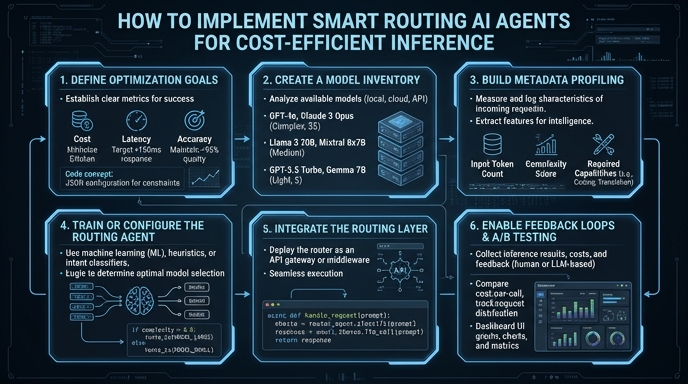
Route your models intelligently
Use one API key for routing, fallback, and cost control across model providers.
Route your models intelligently — try Select